Deleting files before disposing of a computer is not enough for most businesses. When a file is deleted, the computer usually removes the visible reference to that file rather than immediately removing every trace of the underlying data. In many cases, deleted files or fragments of information may still be recoverable from the storage device.
This matters because computers often hold far more sensitive information than users realise. A redundant desktop or laptop may contain customer records, staff data, saved emails, scanned documents, login files, financial spreadsheets, cached browser data, downloads, database exports and commercially confidential information.
For organisations with UK GDPR responsibilities, disposing of a computer is not just an IT housekeeping task. It is a data security process. Before a device leaves business control, the organisation should be confident that data has been securely removed or destroyed using a method appropriate for the storage media.
What actually happens when deleting files?
When a user deletes a file, the operating system usually removes the file from its visible location. It may move it to the recycle bin or mark the storage space as available for reuse. However, the data itself may remain on the storage device until it is overwritten or otherwise sanitised.
This is why deleted files can sometimes be recovered. File recovery tools may be able to locate data that still exists on a hard drive or other storage medium, even though it no longer appears in normal folders.
For day-to-day use, deletion is helpful. It keeps computers tidy, frees up visible storage space and removes files from normal view. For secure disposal, it is not a reliable protection measure.
A business should not assume that “I deleted everything” means “the data is gone”. Those are different outcomes.
Can deleted files still be recovered?
Yes, deleted files can sometimes be recovered, depending on the storage device, how the files were deleted, whether new data has overwritten the same space and what recovery methods are used.
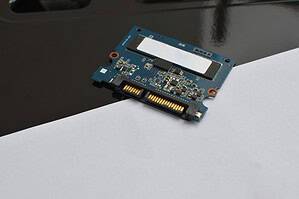
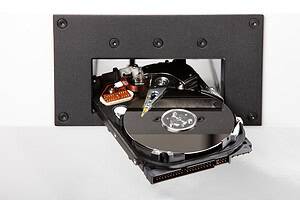
On traditional magnetic hard drives, deleted data may remain until the relevant storage sectors are overwritten. On SSDs and flash-based devices, the situation can be more complex because of how flash memory manages data internally.
Recovery may not always be complete, but even partial recovery can be a problem. A fragment of a spreadsheet, a cached document, an email archive or a database file may still reveal personal, financial or commercially sensitive information.
For businesses, the risk is not limited to complete file recovery. Even small amounts of exposed data can be damaging if the information relates to clients, staff, contracts, legal matters or regulated activity.
Is emptying the recycle bin enough?
Emptying the recycle bin is not enough before computer disposal. It removes the easy route to restore deleted files, but it does not necessarily remove the underlying data from the storage device.
A computer may look clean to a normal user. The desktop may be empty, the documents folder may have been cleared and the recycle bin may show no files. That does not mean the storage media is safe to sell, donate, recycle or discard.
The same applies to removing user accounts or uninstalling software. These actions may reduce visible access, but they should not be treated as secure data destruction.
Is formatting a computer enough?
Formatting is more thorough than simply deleting visible files, but it is still not always enough for business disposal.
A quick format may remove file system structures and make the device appear blank. However, data may still remain until it is overwritten or properly sanitised. A full format may provide a greater level of erasure in some cases, but the reliability depends on the operating system, storage media and exact method used.
The risk increases when organisations use mixed storage devices. A process that may be suitable for a traditional hard drive may not provide the same assurance for an SSD. SSDs use flash memory, wear levelling and reserved areas that can make complete verification more difficult.
For a business, the question should not be “does the computer look empty?” The question should be “can we prove the data was securely destroyed or sanitised using an appropriate method?”
Why computer disposal is a data protection issue
Computer disposal becomes a data protection issue because old devices can contain personal data long after they stop being used.
Personal data may include names, addresses, phone numbers, email addresses, employee information, customer records, payroll files, scanned ID documents, supplier contacts, health information or client case notes. Even if these files are old, they may still fall within the organisation’s data protection responsibilities.
If a computer is disposed of without secure data destruction and the information is later recovered, the organisation may face data breach risks, reputational damage, client trust issues and compliance questions.
This is especially important for organisations such as:
- Financial institutions
- Healthcare providers
- Legal firms
- Public sector organisations
- Data centres and IT departments
- Professional services firms
- Businesses handling customer databases
- Organisations with remote or hybrid workers
Any business that processes personal or sensitive data should have a clear process for retiring computers and storage devices.
What data might be left on an old computer?
Many users think about obvious files such as documents and spreadsheets. In reality, a computer may hold data in many less obvious locations.
Old computers may contain:
- Downloads and temporary files
- Email archives
- Browser history and cached files
- Saved passwords or session data
- Local database files
- Application data
- Scanned documents
- Client folders
- HR records
- Financial exports
- Backup files
- Deleted files awaiting overwrite
- Data stored in hidden folders
- Synchronised cloud files
This is why simply checking the desktop and documents folder is not enough. Sensitive information may exist in system folders, application caches or user profiles that are not obvious during a manual clean-up.
What about computers used with cloud services?
Even when a business mainly uses cloud services, old computers can still contain local data. Files may have been downloaded temporarily, synchronised for offline access, cached by software or saved by users outside approved systems.
A laptop used for Microsoft 365, Google Workspace, CRM systems or accounting software may still hold local copies, browser tokens, attachments, exports or cached information. If the device is not properly sanitised before disposal, those traces may create risk.
Cloud-based working reduces reliance on local storage, but it does not remove the need for secure device disposal.
What should businesses do before disposing of a computer?
Before disposing of a computer, businesses should treat it as a data-bearing asset. The process should be planned, controlled and documented.
A secure approach should include identifying the device, checking what type of storage it contains, deciding whether the device will be reused or permanently destroyed, and selecting the right data destruction method.
For computers at end of life, it is often safest to remove and destroy the storage media. This may involve hard drive destruction, SSD destruction or another method depending on the device. The remaining equipment can then move into an appropriate recycling or disposal route.
For computers being reused internally, secure sanitisation may be appropriate where the organisation has the right tools and verification process. However, if a computer is leaving organisational control, the standard of assurance should be higher.
Should the whole computer be destroyed?
Not always. In many cases, the data-bearing storage media can be removed and destroyed, while the remaining equipment is recycled responsibly. This can help organisations balance data security with environmental responsibility.
However, businesses must be careful. Some devices contain storage in less obvious places. Modern laptops may use small M.2 SSDs. Tablets and mobile devices may have embedded memory. Multi-function printers and specialist equipment may also store information.
Destroying or sanitising only the obvious hard drive may not be enough if other storage remains inside the device.
A secure disposal process should identify every data-bearing component before equipment is released for recycling or resale.
What is the difference between wiping and destruction?
Wiping is a sanitisation process that attempts to erase data while leaving the storage device usable. Destruction permanently damages or destroys the storage device so it cannot be reused.
Both approaches can have a place, but they serve different needs.
Wiping may be suitable when equipment is being redeployed within the same organisation and the process can be verified. Destruction is often more appropriate when storage media is at end of life, contains sensitive data, or is leaving the organisation’s control.
For magnetic hard drives, destruction may include degaussing, crushing or shredding. For SSDs and flash-based storage, destruction must target the memory chips, because degaussing is not suitable.
Real-world scenario: disposing of old office desktops
A business replaces 60 desktop computers after a system upgrade. Staff are asked to copy anything important to the new system and delete files from the old machines. The computers are then placed in a storage room ready for disposal.
This creates several risks. Some files may have been missed. Deleted data may still be recoverable. User profiles may contain cached documents. Some computers may contain SSDs rather than magnetic hard drives. If the machines are collected as general electronic waste, the business may lose control of the data-bearing assets.
A safer process would involve recording the devices, removing or identifying the storage media, using a suitable destruction method for each drive type, retaining a certificate of data destruction and then recycling the remaining hardware responsibly.
Real-world scenario: remote worker laptop returns
A remote employee leaves the business and returns a laptop by courier. The device is password-protected and the user says they have deleted their files. The laptop looks intact and may be suitable for reuse.
Before redeployment or disposal, the organisation should not rely on the user’s deletion. The device may contain downloaded files, cached emails, personal data, client information or locally stored credentials. It should go through a formal sanitisation or destruction process depending on whether it will be reused.
This protects both the organisation and the employee. It ensures business data is handled consistently rather than relying on individual judgement.
How can organisations prove data has been securely destroyed?
Proof is essential for compliance, audit readiness and internal accountability. Businesses should keep records showing what happened to devices and storage media after they left active use.
Useful evidence may include:
- Asset registers
- Collection records
- Chain of custody documentation
- Media type identification
- Destruction method details
- Date and location of destruction
- Certificate of data destruction
- Recycling or disposal records
A certificate of data destruction is particularly valuable because it provides formal evidence that storage media was processed using a defined method. For larger projects, serial number records or itemised inventories may also be appropriate.
The certificate should match the process. For example, if SSDs were destroyed, the certificate should not simply refer to hard drive degaussing. It should accurately reflect the media type and destruction method used.
How does secure disposal support GDPR compliance?
Secure disposal supports GDPR compliance by reducing the risk that personal data remains accessible after a computer is retired, transferred, recycled or discarded.
UK GDPR requires organisations to protect personal data using appropriate security measures. Those responsibilities do not end when a computer is no longer in active use. If the device still contains personal data, it must be handled securely until the data has been removed or destroyed.
A documented disposal process shows that the organisation took reasonable steps to protect information. It also helps avoid informal disposal practices, such as giving old computers away, selling them without proper sanitisation or sending them to recycling with intact storage media.
Frequently Asked Questions
Is deleting files enough before selling a business computer?
No. Deleting files is not enough before selling a business computer. Data may still be recoverable from the storage media. The device should be securely sanitised or the storage media should be destroyed before it leaves business control.
Is a factory reset enough before disposal?
A factory reset may not provide enough assurance for business disposal, especially where sensitive or personal data is involved. The effectiveness depends on the device, storage type and reset method. A formal destruction or sanitisation process is safer.
Can deleted files be recovered from an old computer?
Yes, deleted files may be recoverable in some cases. The risk depends on the storage media and whether the data has been overwritten or properly destroyed.
Should hard drives be removed before recycling computers?
In many business disposal processes, removing and securely destroying the storage media is a sensible approach. This helps ensure data is protected before the remaining hardware is recycled.
Do businesses need a certificate of data destruction?
Yes, a certificate of data destruction helps prove that storage media was processed using a defined destruction method. It supports compliance records, audits and customer assurance.
Summary
Deleting files before disposing of a computer is not enough for most organisations. Deleted files may still be recoverable, and old computers often contain sensitive information in hidden, cached or forgotten locations.
Businesses should treat redundant computers as data-bearing assets until storage media has been securely sanitised or destroyed. The correct method depends on the type of storage involved, whether the device will be reused and the sensitivity of the data.
A secure process should include media identification, controlled handling, appropriate destruction, an audit trail and a certificate of data destruction. This helps reduce data breach risk, support GDPR data disposal and protect the organisation from avoidable compliance issues.
Varese Secure Ltd provides secure data destruction, hard drive destruction and compliant IT asset disposal services for organisations that need a controlled, traceable and security-led process.
Contact Varese Secure Ltd
Phone: 01489 854 131
Email: sales@varese-secure.co.uk
Find out more: https://varese-secure.co.uk/
-
How Can Businesses Balance Data Security and Responsible Recycling?
Supporting Questions: Businesses can balance data security and responsible recycling by making sure data-bearing assets are securely destroyed or sanitised before equipment enters the recycling process. The priority should always be to protect confidential and…
-
Why Do SSDs Need a Different Destruction Method from Hard Drives?
SSDs need a different destruction method from hard drives because they store data in a completely different way. Traditional hard disk drives use magnetic platters, while solid-state drives use flash memory chips. This means a…
-
How Can Organisations Prove They Followed Secure Destruction Standards?
Organisations can prove they followed secure destruction standards by keeping clear, accurate and traceable evidence of how data-bearing assets were handled, destroyed and disposed of. This evidence should show what was collected, who handled it,…