Supporting Questions:
- What counts as flash-based storage?
- Why is flash storage harder to destroy securely?
- Is deleting or formatting flash storage enough?
- What destruction methods work for SSDs, USB drives and memory cards?
- How can businesses prove flash-based storage has been destroyed securely?
The best way to destroy data on flash-based storage is to use a destruction method designed for the specific type of device and the level of data risk involved. For end-of-life business assets, this often means physical destruction of the data-bearing memory chips, supported by a clear audit trail and a certificate of data destruction.
Flash-based storage includes SSDs, USB memory sticks, SD cards, microSD cards, mobile devices and embedded memory chips. These devices do not store data in the same way as traditional magnetic hard drives. As a result, older destruction methods such as hard drive degaussing are not suitable for them.
For organisations handling personal data, financial records, legal files, healthcare information, customer data or commercially sensitive information, choosing the right flash storage destruction method is essential. A device may be tiny, inexpensive or physically damaged, but it can still hold a significant amount of confidential information.
What is flash-based storage?
Flash-based storage uses non-volatile memory chips to store data electronically. Non-volatile means the information remains stored even when the device is switched off or removed from power.
This type of storage is now common across modern business technology. It is found in obvious devices such as SSDs and USB sticks, but also in equipment that may not immediately look like data-bearing media.
Common examples include:
- Solid-state drives
- USB memory sticks
- SD cards
- MicroSD cards
- Mobile phones and tablets
- Digital cameras
- Multi-function printers
- Network devices
- Embedded industrial systems
- Some servers and specialist IT hardware
This creates a practical challenge. A business may have a clear process for old computers and hard drives, but flash storage can be much easier to overlook. A USB stick in a drawer, a memory card in a camera, or storage built into a device may still contain sensitive data long after the equipment has stopped being used.
Why does flash storage need a different destruction approach?
Flash storage needs a different destruction approach because data is held in memory chips rather than magnetic platters. Traditional hard disk drives store data magnetically, which means degaussing can be effective when used correctly. Flash-based storage does not work in that way.
A magnetic field may damage some electronic components, but it should not be relied on to erase or destroy the data held inside flash memory chips. This is why degaussing is not an appropriate destruction method for SSDs, USB drives, SD cards or other flash-based media.
The problem is not just the technology itself. It is also the way flash storage manages data internally. Many flash devices use processes designed to improve performance and extend lifespan. These features can make simple deletion, formatting or overwriting less reliable as a destruction method.
Why is deleting files not enough?
Deleting files from flash-based storage is not the same as destroying the data. In many cases, deletion removes the visible reference to a file and marks the space as available. It does not necessarily remove all traces of the data immediately from every memory cell.
A user may delete a folder from a USB stick, empty the recycle bin or format an SSD and believe the data has gone. In reality, depending on the device and method used, data may still exist in areas that are not visible through normal browsing.
For businesses, this is a significant risk. An old USB drive may contain exported spreadsheets, scanned IDs, HR files, client lists, passwords, reports, contracts or confidential project documents. A formatted SSD from a laptop may still contain recoverable information if it has not been properly sanitised or destroyed.
Deletion is an everyday file management action. Secure destruction is a risk-controlled disposal process. They should not be treated as the same thing.
What makes SSDs and flash media difficult to sanitise?
Flash storage can be more complex to sanitise because the device itself manages where data is written, moved and retired. This internal behaviour is useful during normal operation, but it creates challenges when an organisation needs to prove that data is gone.
Wear levelling
Wear levelling spreads data writes across memory cells so that the same areas are not used repeatedly. This helps extend the life of an SSD or flash device. However, it can mean data is not stored in a simple, predictable location.
If software overwrites what appears to be a file’s location, copies or fragments may still exist elsewhere on the device.
Over-provisioning
Many SSDs include reserved storage space that is not directly visible to the operating system. This extra capacity helps performance and reliability, but it can make full sanitisation harder to verify through basic user-level tools.
Bad blocks
Flash memory can develop areas that the device stops using. These blocks may no longer be accessible in the normal way, but they may still contain remnants of previous data.
Small and varied device formats
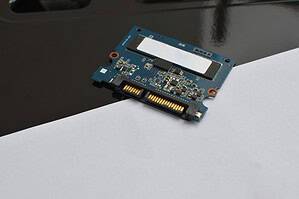
Flash storage appears in many forms. A 2.5-inch SSD may look similar to a laptop hard drive, while an M.2 SSD looks like a small circuit board. A microSD card is tiny but may hold tens or hundreds of gigabytes of data. Embedded chips may be fixed directly onto a circuit board.
This variety means businesses need a destruction process that identifies the actual data-bearing component, not just the overall device.
What is the best method for destroying data on flash-based storage?
For end-of-life business assets, the safest approach is usually physical destruction that targets the flash memory chips themselves. The exact method will depend on the device type, sensitivity of the data and required security level.
The goal is to make the data-bearing components unreadable and unrecoverable using practical recovery methods.
SSD crushing
SSD crushing can be suitable when the equipment is designed to damage the storage chips, not just bend the casing. A general hard drive crusher may not always be enough for SSDs unless it is intended for flash media.
For SSDs, the important question is whether the memory chips have been sufficiently destroyed. If the casing is bent but the chips remain intact, risk may remain.
SSD shredding
Shredding breaks the SSD into small pieces. This can be an effective option for end-of-life SSDs, especially where large volumes of devices need to be processed. The appropriate particle size should reflect the sensitivity of the data and the organisation’s security requirements.
Shredding is often useful because it produces a clear physical outcome and can be supported by a certificate of destruction.
Flash media shredding
USB sticks, SD cards and memory cards can also be shredded using suitable equipment. Because these devices are small, the process must ensure the memory chips are properly destroyed rather than simply damaging the plastic casing.
A USB stick may look cheap or disposable, but it can hold substantial amounts of sensitive information. It should be treated as a data-bearing asset.
Disintegration
For higher-security environments, disintegration may be used to reduce flash media to very small particles. This is generally used where recovery risk must be reduced as far as reasonably possible, or where strict internal, contractual or regulatory requirements apply.
Chip-level destruction
Some devices require targeted destruction of the actual memory chips. This may be relevant for mobile devices, embedded storage, specialist electronics or equipment where the storage is not removable in a standard drive format.
Is software wiping ever suitable for flash storage?
Software wiping may be suitable in some controlled situations, particularly where a device is being reused internally and the correct sanitisation tools are used. However, it is not always the best choice for end-of-life disposal, especially when the device is leaving the organisation’s control.
A business considering software wiping must be confident that the tool is appropriate for the device and that the result can be verified. For flash-based storage, this can be more complex than it is for traditional hard drives.
Where the data is sensitive, the device is no longer needed, or proof of destruction is required, physical destruction is usually the more reassuring option.
Real-world scenario: USB drives used by staff
A business finds a collection of old USB memory sticks in desks, meeting rooms and laptop bags. Some were used for client presentations, some for transferring files between offices, and some are unlabelled.
It may be tempting to plug them in, delete anything visible and put them into electronic waste. That would not be a secure process. The organisation may not know what data they contain, who used them, or whether deletion has removed the information properly.
A safer approach is to treat the USB drives as potentially sensitive. They should be collected securely, recorded where practical, physically destroyed using a suitable flash media destruction method and included in a certificate of data destruction.
Real-world scenario: SSDs from retired laptops
A company replaces 200 laptops after a hardware refresh. The older devices contain a mixture of SATA SSDs and smaller M.2 SSDs. Some laptops are working, while others are damaged or locked.
If the business handles these assets like old magnetic hard drives, it may choose the wrong destruction method. Degaussing would not be suitable. Simply removing the drives and storing them for later also creates a security risk.
A better process is to remove and identify the SSDs, separate them from magnetic hard drives, destroy them using a method suitable for flash storage, and keep an audit trail from collection through to final processing.
How should businesses manage mixed storage devices?
Most organisations now use mixed storage environments. A single disposal project may include magnetic hard drives, SSDs, USB sticks, backup tapes, tablets, phones and memory cards. Each type of media may need a different destruction method.
Businesses should avoid using a single default process for all storage devices. Instead, they should classify media before destruction.
A practical process should include:
- Identifying all devices that may store data
- Separating magnetic media from flash-based storage
- Checking for removable and embedded storage
- Choosing the right destruction method for each media type
- Maintaining secure handling and chain of custody
- Recording destruction details
- Retaining a certificate of data destruction
- Ensuring responsible recycling of remaining materials
This approach reduces the chance of overlooking small devices or applying a hard drive method to flash storage.
How does flash storage destruction support GDPR compliance?
Flash storage destruction supports GDPR compliance by helping organisations reduce the risk of personal data being accessed after equipment is retired, recycled, sold, transferred or discarded.
UK GDPR does not say that every storage device must be destroyed in the same way. Instead, organisations are expected to apply appropriate security measures based on the nature of the data and the risk involved. For disposal, that means choosing a method that prevents unauthorised access to personal data once the device leaves active use.
Flash storage can hold customer records, employee information, scanned documents, emails, login files, reports and other personal data. If a device is disposed of insecurely and the data is later recovered, the organisation may face reputational damage, contractual issues and compliance questions.
A secure, documented destruction process helps show that the business took data protection seriously.
What evidence should a business keep?
Evidence is important because secure destruction should be auditable. Organisations need more than a verbal assurance that devices have been destroyed.
Useful evidence may include:
- Inventory or asset records
- Collection documentation
- Chain of custody information
- Destruction method details
- Date and location of destruction
- Certificate of data destruction
- Recycling or disposal records
The certificate should accurately describe the media and method. For example, if SSDs, USB drives or memory cards were physically destroyed, the certificate should reflect that. A vague certificate may be less useful during an audit or internal review.
Should flash-based storage be destroyed on site?
On-site destruction may be appropriate when an organisation does not want flash-based storage to leave the premises before data is destroyed. This can be especially relevant for data centres, legal firms, healthcare providers, financial institutions, government bodies and businesses handling sensitive commercial data.
On-site destruction can reduce handover risk and provide immediate reassurance that the data-bearing media has been processed before any remaining materials are transported for recycling.
Off-site destruction can also be suitable where secure collection, transport and processing controls are in place. The right choice depends on the organisation’s risk profile, volume of media, compliance requirements and internal policies.
How can businesses balance security and recycling?
Flash-based storage often contains materials that can be recovered or recycled, but recycling should never come before data security. The data-bearing components must be destroyed securely before remaining materials move into recycling streams.
A secure disposal process should therefore address both priorities. First, data must be protected and destroyed. Then, the remaining materials can be handled through responsible recycling routes where appropriate.
This balance is particularly important for organisations with environmental commitments. Responsible recycling is valuable, but it should not involve passing intact data-bearing devices into uncontrolled channels.
Frequently Asked Questions
Can a USB stick still hold data after files are deleted?
Yes. Deleting files from a USB stick does not always remove all recoverable data. For business disposal, USB drives should be securely destroyed or sanitised using an appropriate method.
Can SSDs be destroyed with a hard drive degausser?
No. SSDs do not store data magnetically, so degaussing is not suitable for SSD data destruction. Flash-based storage requires a method designed for memory chips.
Is smashing a USB stick enough?
Smashing the outer casing is not a reliable destruction method. The memory chip may remain intact. Secure destruction should target the chip that actually stores the data.
Should memory cards be included in a data destruction process?
Yes. SD and microSD cards can hold large amounts of sensitive data. They should be treated as data-bearing assets and destroyed securely when no longer required.
Do businesses need a certificate for flash storage destruction?
Yes. A certificate of data destruction provides evidence that flash-based storage was processed using a defined method. This supports compliance, audit readiness and internal accountability.
Summary
The best way to destroy data on flash-based storage is to use a method designed for flash memory, not a process intended for magnetic hard drives. SSDs, USB drives, SD cards and embedded storage devices store data electronically in memory chips, which means degaussing is not suitable.
For end-of-life business assets, physical destruction of the data-bearing chips is often the safest and most auditable option. This may involve crushing, shredding, disintegration or targeted chip destruction, depending on the media type and sensitivity of the data.
Businesses should identify storage media carefully, separate flash devices from magnetic drives, maintain chain of custody and retain a certificate of data destruction. This helps reduce data breach risk while supporting GDPR data disposal and responsible recycling.
Varese Secure Ltd provides secure data destruction and compliant disposal services for organisations that need a traceable, security-led approach to flash-based storage and other end-of-life IT assets.
Contact Varese Secure Ltd
Phone: 01489 854 131
Email: sales@varese-secure.co.uk
Find out more: https://varese-secure.co.uk/
-
How Can Businesses Balance Data Security and Responsible Recycling?
Supporting Questions: Businesses can balance data security and responsible recycling by making sure data-bearing assets are securely destroyed or sanitised before equipment enters the recycling process. The priority should always be to protect confidential and…
-
Why Do SSDs Need a Different Destruction Method from Hard Drives?
SSDs need a different destruction method from hard drives because they store data in a completely different way. Traditional hard disk drives use magnetic platters, while solid-state drives use flash memory chips. This means a…
-
How Can Organisations Prove They Followed Secure Destruction Standards?
Organisations can prove they followed secure destruction standards by keeping clear, accurate and traceable evidence of how data-bearing assets were handled, destroyed and disposed of. This evidence should show what was collected, who handled it,…