Supporting Questions:
- Does physical damage automatically destroy hard drive data?
- What types of hard drive damage can still leave data recoverable?
- Why is DIY hard drive damage risky for businesses?
- What is the difference between damaged and securely destroyed drives?
- How can organisations prove hard drive data has been destroyed?
Yes, physically damaged hard drives can still contain recoverable data. A drive that looks broken, dented, cracked or non-functional may still hold information on its internal platters. Unless the data-bearing components have been properly destroyed, there may still be a risk that files, records or fragments of information can be recovered using specialist methods.
This is an important distinction for businesses. A hard drive that no longer works in a computer is not necessarily a hard drive that has been securely destroyed. From a data protection perspective, “broken” and “safe to dispose of” are not the same thing.
For organisations handling customer details, employee records, financial data, legal documents, healthcare information or commercially sensitive files, relying on visible damage alone can create unnecessary risk. Secure data destruction requires a controlled method, clear handling procedures and evidence that the process has been completed correctly.
Why a broken hard drive can still hold data
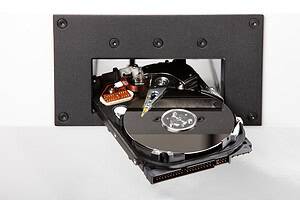
Traditional hard disk drives store data magnetically on internal platters. These platters are the most important part of the drive from a data security point of view. The outer casing, circuit board, connectors and read/write heads may all be damaged, but the platters may still contain readable data.
A drive may fail for many reasons. It may have been dropped, exposed to water, overheated, struck, mishandled or affected by an electrical fault. In many of these cases, the operating system can no longer access the drive, but that does not mean every trace of data has gone.
Specialist data recovery providers may be able to recover information from drives that ordinary users cannot access. They may replace damaged components, use specialist hardware, work in cleanroom environments or extract data from platters directly.
This is useful when a business needs to recover lost files from a failed drive. However, it also highlights the risk of treating a failed drive as harmless. If data can potentially be recovered for legitimate purposes, it may also remain exposed if the drive is disposed of insecurely.
What types of physical damage may still leave data recoverable?
Not all damage affects the data-bearing surfaces of a hard drive. Some types of damage may stop the drive working while leaving the platters largely intact.
Damaged casing
A dented or cracked casing may look severe, but it does not always mean the internal platters have been destroyed. If the platters remain intact, data may still exist.
This is why visual inspection is not enough. A drive can look badly damaged on the outside while still retaining data internally.
Broken connectors
If the SATA, power or data connectors are damaged, the drive may not connect to a computer. However, connector damage does not necessarily affect the stored data. In some cases, a replacement board or specialist equipment may allow access again.
Failed circuit board
A hard drive with a damaged printed circuit board may appear completely dead. However, the data is not stored on the external board. It is stored on the platters inside the drive. With the right expertise, recovery may still be possible.
Head crash or mechanical failure
A head crash can damage the platter surface, but the extent of damage varies. Some data may be lost, while other areas may remain readable. Partial recovery may still be possible depending on the condition of the platters.
Water damage
Water exposure can cause corrosion and mechanical problems, but it does not always instantly remove magnetic data from platters. A water-damaged drive should not be assumed safe for disposal.
Fire or heat damage
Severe fire damage may destroy data, but less extreme heat or smoke damage may not. A drive recovered from a fire-damaged office or server room may still contain recoverable fragments if the platters survive.
Why DIY hard drive damage is risky
Many people have seen informal advice suggesting that a hard drive can be made safe by drilling holes in it, hitting it with a hammer, removing the circuit board or scratching the casing. For personal use, these methods may feel reassuring. For organisations, they are not a reliable compliance-led approach.
The problem is consistency. DIY damage often affects only part of the drive. A drill hole may pass through one section of the platters but leave other sections intact. A hammer blow may bend the casing without sufficiently destroying the internal surfaces. Removing the circuit board may stop easy access but leave the data-bearing components untouched.
Businesses also need to consider evidence. Even if a drive has been damaged, the organisation may not be able to prove that the data was destroyed properly. In the event of a customer complaint, supplier audit, insurance query or data protection investigation, “we damaged it ourselves” is unlikely to provide the same reassurance as a documented destruction process.
Damaged is not the same as securely destroyed
A physically damaged hard drive is a condition. Secure destruction is a controlled outcome.
A damaged drive may be unreadable to ordinary users. A securely destroyed drive should be processed so that data recovery is no longer practical or possible using reasonable means. That usually requires a recognised destruction method matched to the media type.
For magnetic hard drives, secure destruction may involve degaussing, shredding, crushing or a combination of methods. Degaussing disrupts the magnetic data stored on the platters, while physical shredding or crushing destroys the drive itself. For highly sensitive information, organisations may choose more than one method to reduce risk further.
The right approach depends on the data, the industry, the organisation’s policies and whether the media needs to be reused or permanently disposed of. For end-of-life drives, physical destruction is often preferred because it provides a clear, visible final state.
What about hard drives that have already failed?
Failed hard drives should still be treated as data-bearing assets unless they have been securely destroyed.
This is a common issue during IT refresh projects. A business may collect old computers, laptops, external drives and server hardware and separate out the items that still work from those that do not. The broken drives may be treated as scrap, while working drives receive more careful handling.
That creates a risk. The failed drives may still contain the same types of information as the working ones. In some cases, they may contain even more sensitive material because they have been sitting unused, untracked or forgotten for years.
A safer approach is to treat all storage media as potentially sensitive until proven otherwise. That includes drives labelled as faulty, obsolete, dead, unbootable or damaged.
Real-world scenario: the forgotten box of damaged drives
Imagine a business moves office and discovers a box of old hard drives in an IT cupboard. Some are labelled “faulty”, some have bent casings, and several have been removed from computers years earlier. Nobody is sure what they contain.
It would be risky to dispose of them as general electronic waste. They may contain payroll data, customer records, old email archives, scanned documents, contracts or login information. Even if several drives no longer power up, the data-bearing platters may still hold information.
The correct approach would be to record the drives, keep them secure, choose an appropriate destruction method and obtain evidence that destruction has taken place.
Real-world scenario: a damaged laptop after an accident
A company laptop is dropped and the hard drive no longer works. The screen is broken, the casing is cracked and the device will not start. It may be tempting to treat the laptop as waste.
However, the internal storage may still hold business data. If the laptop used a traditional hard drive and the platters remain intact, information may still be recoverable. If it used an SSD, the storage chips may still contain data even when the device itself is badly damaged.
This is why businesses should have a clear process for damaged IT equipment. The asset should remain controlled until the storage media has been identified and securely destroyed or sanitised.
How does this relate to GDPR data disposal?
Under UK GDPR, organisations must protect personal data against unauthorised access, loss, destruction or disclosure. Disposal is part of that responsibility. If a damaged drive containing personal data is discarded without secure destruction, the organisation may still be responsible if the information is later accessed.
The risk is not limited to obvious personal data. Business drives may contain spreadsheets, emails, scanned IDs, HR records, supplier details, passwords, customer communications, database exports or confidential project files.
Secure destruction helps reduce the risk of data breach, but organisations also need the right documentation. A clear audit trail can show that the business took appropriate steps to protect information during disposal.
What should a secure hard drive destruction process include?
A reliable process should cover more than the moment of destruction. It should control the asset from identification through to final disposal.
For businesses, a secure hard drive destruction process should usually include:
- Identification of storage media
- Secure handling before destruction
- Controlled collection or transfer
- Separation of hard drives, SSDs and other media types
- Appropriate destruction method for each media type
- Recording of assets or quantities
- Certificate of data destruction
- Responsible recycling of remaining materials where applicable
This process reduces both technical risk and compliance risk. It also avoids the common mistake of treating all damaged electronics as harmless waste.
How can organisations prove damaged drives were destroyed properly?
Proof matters because secure destruction is partly about accountability. A business should be able to show what happened to data-bearing assets after they left active use.
A certificate of data destruction is an important part of that evidence. It should confirm key details such as the destruction date, destruction method and the type or quantity of media destroyed. For more sensitive environments, serial number recording or detailed asset lists may also be required.
Chain of custody records are also useful. These show how the drives were handled, collected, transported and processed. This is particularly important where drives are taken off site before destruction.
The goal is to avoid gaps. If a business cannot show where a drive went or how it was destroyed, it may struggle to demonstrate that it followed a secure disposal process.
Should physically damaged hard drives be destroyed on site?
On-site data destruction can be useful for organisations that do not want damaged or redundant drives to leave their premises before destruction. This may apply to data centres, financial institutions, healthcare providers, legal firms, public sector organisations and businesses with strict internal security policies.
On-site destruction gives organisations the reassurance of seeing the process take place at their location. It can also simplify chain of custody, because the data-bearing media is destroyed before it is transported for recycling or further processing.
Off-site destruction can also be suitable when secure collection and transport controls are in place. The best option depends on the organisation’s risk level, volume of drives, location, audit requirements and internal policies.
What is the best method for physically damaged hard drives?
The best method depends on the type of drive and the sensitivity of the data.
For traditional magnetic hard drives, degaussing can be effective when suitable equipment is used. However, because the drive is already physically damaged and will not be reused, shredding or crushing may also be appropriate. For high-risk environments, combining degaussing with physical destruction can provide stronger reassurance.
For SSDs and flash-based storage, degaussing is not suitable. These devices require a different destruction method, usually involving physical destruction of the memory chips if the device is at end of life.
The most important point is that the method must match the storage media. A damaged hard drive and a damaged SSD may look like similar IT waste, but they require different destruction considerations.
Frequently Asked Questions
Can data be recovered from a hard drive that will not turn on?
Yes, it may be possible. A drive that will not power up may have a failed circuit board, damaged connector or mechanical issue, while the stored data remains on the platters. It should still be treated as sensitive until securely destroyed.
Is drilling through a hard drive enough?
Drilling may damage part of the drive, but it is not a reliable business-grade destruction method. Sections of the platters may remain intact, and there may be no proper audit trail or certificate of destruction.
Can data be recovered from a smashed hard drive?
It depends on the extent of the damage. If platter fragments remain, some information may still be recoverable in certain circumstances. For business disposal, controlled destruction is safer than informal damage.
Should faulty hard drives be included in IT disposal records?
Yes. Faulty drives should be recorded and handled as data-bearing assets. Their failure does not prove that the data has been destroyed.
Do businesses need a certificate of data destruction?
A certificate of data destruction provides evidence that storage media was processed using a defined method. It supports compliance, audit requirements and internal accountability, especially where personal or sensitive data is involved.
Summary
Physically damaged hard drives can still contain recoverable data. A cracked casing, broken connector, failed circuit board or non-working drive does not automatically mean the information inside has been securely destroyed. In many cases, the data-bearing platters may still hold files or fragments of information.
For businesses, the safest approach is to treat all hard drives as potentially sensitive until they have been processed through a secure destruction method. This is especially important for organisations handling personal data, confidential records or regulated information.
Secure destruction is not just about damaging a device. It is about using the right method, maintaining control of the asset, recording the process and keeping evidence that destruction has been completed.
Varese Secure Ltd provides secure hard drive destruction, degaussing and compliant data disposal services for organisations that need a traceable, security-led process.
Contact Varese Secure Ltd
Phone: 01489 854 131
Email: sales@varese-secure.co.uk
Find out more: https://varese-secure.co.uk/
-
How Can Businesses Balance Data Security and Responsible Recycling?
Supporting Questions: Businesses can balance data security and responsible recycling by making sure data-bearing assets are securely destroyed or sanitised before equipment enters the recycling process. The priority should always be to protect confidential and…
-
Why Do SSDs Need a Different Destruction Method from Hard Drives?
SSDs need a different destruction method from hard drives because they store data in a completely different way. Traditional hard disk drives use magnetic platters, while solid-state drives use flash memory chips. This means a…
-
How Can Organisations Prove They Followed Secure Destruction Standards?
Organisations can prove they followed secure destruction standards by keeping clear, accurate and traceable evidence of how data-bearing assets were handled, destroyed and disposed of. This evidence should show what was collected, who handled it,…