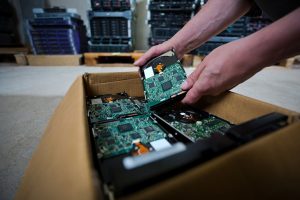
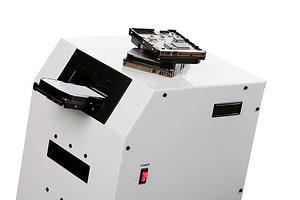
SSD crushers can be suitable for data centres and IT departments, provided the equipment is designed specifically for solid-state media and produces a level of physical destruction appropriate to the sensitivity of the data.
They can offer a controlled way to destroy failed, obsolete or end-of-life solid-state drives at the point of decommissioning. This may be particularly useful for organisations processing large numbers of devices, operating secure facilities or following policies that prevent intact storage media from leaving the premises.
However, not every crushing machine provides the same result. An SSD may appear severely damaged while some of its flash memory chips remain intact. Those chips are the components that hold the data, so the suitability of a crusher depends on whether it reliably damages the memory-bearing parts rather than merely bending the casing or breaking the drive’s connector.
For data centres and IT departments, the equipment must also fit into a wider sanitisation process. Asset identification, secure storage, operator controls, reconciliation and certification are as important as the mechanical action of the crusher itself.
The National Cyber Security Centre advises organisations to select sanitisation methods according to the sensitivity of the data and the storage media involved. It also distinguishes between media that may be sanitised for reuse and media that should be physically destroyed because reuse is not appropriate.
How does an SSD crusher destroy stored data?
An SSD crusher applies concentrated physical force to a solid-state drive.
Depending on the machine, this force may puncture, fold, break, shear or deform the device. The objective is to damage its internal circuit board and the flash memory packages attached to it.
This is fundamentally different from erasing a conventional magnetic hard disk drive.
A hard disk drive stores information magnetically on rotating platters. An SSD stores data electronically within NAND flash memory chips. These chips have no moving parts and are not dependent on magnetic recording.
A purpose-designed crusher should therefore target the parts of the SSD that actually retain information.
The process may involve:
- Recording the asset or serial number.
- Placing the SSD into a controlled loading area.
- Activating the crushing mechanism.
- Applying sufficient force to damage the drive and internal components.
- Inspecting or verifying the result.
- Placing the damaged media into a secure container for further processing or recycling.
- Updating the asset record to show that destruction has been completed.
The effectiveness of the process depends on the construction of the drive, the position of the memory chips and the design of the crusher.
A machine intended for traditional hard drives may create obvious damage to an SSD without consistently reaching every flash memory package. Data centres should therefore confirm that the equipment has been designed and evaluated for solid-state devices.
Why do SSDs need different treatment from hard disk drives?
Hard disk drives and SSDs use different storage technologies.
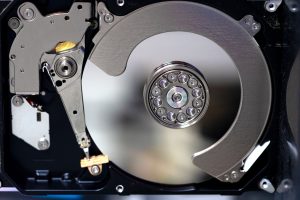
Traditional hard drives contain magnetically coated platters, read and write heads, a spindle motor and electronic control components. Degaussing can destroy the magnetic patterns on the platters when sufficiently powerful and correctly specified equipment is used.
SSDs contain circuit boards populated with flash memory chips, a controller and supporting electronic components. Because their data is not stored magnetically, degaussing is not an appropriate SSD destruction method.
The NCSC specifically warns that magnetic media and semiconductor-based storage require different sanitisation approaches. Its guidance states that physical destruction should reduce the media so that reconstructing it and recovering the data is infeasible for the anticipated threat level.
This distinction matters because data centres frequently handle mixed media.
A typical decommissioning project might include:
- Enterprise hard disk drives
- SATA and NVMe SSDs
- M.2 storage modules
- Server cache devices
- USB flash drives
- SD or microSD cards
- Backup tapes
- Storage controller boards
- Mobile devices with embedded memory
Applying the same destruction process to all these items can leave some media insufficiently treated.
An effective media-destruction programme should identify the storage technology first and then assign the correct method.
Are SSD crushers appropriate for high-volume IT environments?
They can be, particularly where a data centre or IT department regularly generates failed and retired drives.
Keeping an SSD crusher on-site, or using a mobile crushing service, can reduce the period for which intact media must remain in secure storage. It may also allow devices to be destroyed soon after they are removed from servers, storage arrays or employee equipment.
Managing predictable volumes of retired media
Large IT environments often replace equipment as part of planned refresh cycles. They may also accumulate failed drives that cannot be returned to service, wiped through software or sent back through ordinary warranty channels.
An SSD crusher can provide a repeatable physical process for these devices.
It may be especially useful where the organisation has:
- A steady volume of failed SSDs
- Formal decommissioning procedures
- Secure processing space
- Authorised and trained operators
- Asset-level inventory records
- A requirement for witnessed destruction
- Restrictions on removing intact media from the premises
The business case should still consider how frequently the equipment will be used. An organisation processing only a small number of SSDs each year may find a specialist collection or on-site service more appropriate than purchasing and maintaining its own machine.
Supporting rapid decommissioning
Data centres may need to replace failed storage devices quickly to maintain resilience and service availability.
Once a device has been removed, it becomes an asset-management and data-security responsibility. It should not remain indefinitely on a desk, in an unlocked cupboard or in an unrecorded box of faulty components.
The ICO recommends keeping hardware awaiting destruction in a secure location with restricted access, maintaining a log of the devices and documenting the disposal method used.
An accessible SSD crusher can shorten the period between removal and destruction, but only when the organisation’s authorisation and record-keeping procedures are followed.
What should a data centre consider when selecting an SSD crusher?
The decision should not be based only on the machine’s physical force or advertised throughput.
The central question is whether the resulting damage makes recovery of the target data infeasible at the required security level.
Media compatibility
The organisation should identify every SSD format it expects the machine to accept.
These may include standard 2.5-inch drives, thicker enterprise drives, M.2 modules, circuit boards and proprietary storage units.
A loading slot designed for one drive format may not safely or effectively accommodate another. The supplier should state the accepted dimensions, construction types and media categories.
Questions to ask include:
- Is the machine specifically intended for SSDs?
- Which SSD dimensions can it accept?
- Can it process exposed circuit boards and M.2 modules?
- Does it damage each flash memory package?
- Is a second-stage shredding process recommended?
- What happens if the drive contains unusually positioned memory chips?
- How is incomplete processing identified?
The level of physical damage
A visibly bent SSD is not necessarily a securely destroyed SSD.
The metal or plastic casing may be deformed while the internal circuit board and memory chips remain comparatively intact. Even a broken circuit board may contain undamaged memory packages.
The organisation should understand the output of the machine rather than judging effectiveness from its name.
Some crushers punch through a drive at one or more fixed points. Others fold, shear or repeatedly deform the media. The outcome should be assessed against the drive layouts being processed.
Where individual chips could survive crushing, a subsequent solid-state shredding process may be required. Shredding can reduce the drive and memory packages into much smaller fragments, making reconstruction substantially more difficult.
The sensitivity of the information
The chosen method should reflect the risk associated with the data.
An SSD from a general training workstation may not present the same exposure as a drive from a system containing payment information, confidential legal records, patient data or sensitive government material.
NIST’s current media-sanitisation guidance describes sanitisation as making access to target data infeasible for a specified level of effort. This means the required process should be selected according to the confidentiality of the data and the likely capability of anyone attempting recovery.
Organisations should therefore define their own risk categories before selecting equipment. A single process should not be assumed sufficient for every information classification without assessment.
Throughput and operating controls
A crusher used in a busy data centre needs to fit the expected workload.
Theoretical cycle speed is only one consideration. Total processing time also includes scanning serial numbers, verifying devices, loading them safely, inspecting output and reconciling records.
A faster machine does not necessarily produce a faster compliant process if asset recording becomes the bottleneck.
The organisation should consider:
- Typical daily and monthly volumes
- Whether drives will be processed individually or in batches
- Cooling or duty-cycle limitations
- Noise and operating-space requirements
- Operator training
- Guarding and safety controls
- Jam detection
- Maintenance requirements
- Access restrictions
- Evidence produced for each cycle
These details are particularly important if several departments share the equipment.
Is crushing alone sufficient for every SSD?
Not necessarily.
Crushing may be an appropriate final destruction method where the machine reliably damages the flash memory components to the required level. In other situations, crushing may be used as an initial step before specialist shredding.
The correct approach depends on:
- The crusher design
- The SSD construction
- The number and position of memory chips
- The sensitivity of the stored information
- The organisation’s destruction standard
- The required fragment size
- The anticipated data-recovery threat
When might shredding be required after crushing?
Shredding may be selected when an organisation requires more comprehensive physical reduction of the media.
A solid-state media shredder is designed to break the device and its electronic components into smaller pieces. The required particle size should be based on the organisation’s risk assessment and any applicable security standard.
Crushing and shredding should not be viewed as interchangeable labels. They produce different physical outcomes.
For example, a crusher may quickly make a drive unusable and prevent ordinary access. A specialist shredder may go further by breaking apart the circuit board and memory packages.
For high-risk information, organisations may choose a multi-stage process:
- The SSD is identified and authorised for disposal.
- Software or cryptographic sanitisation is attempted where appropriate and verifiable.
- The drive is physically crushed.
- The crushed drive is passed through a solid-state shredder.
- The resulting material is securely contained.
- Asset and destruction records are reconciled.
- A certificate of destruction is issued.
Not every case requires all these stages, but the chosen process should be defensible.
Why drilling or hammering may be inadequate
Informal damage methods are difficult to control and verify.
Drilling one hole through an SSD may miss every memory package. Striking the casing with a hammer may break the connector or controller while leaving the NAND chips intact.
These approaches also create safety risks and offer little consistency between devices.
A controlled machine provides a repeatable process, but the result must still be evaluated against the media technology. The fact that a drive no longer connects to a computer does not prove that its stored data has been permanently destroyed.
Can SSDs be securely erased instead of crushed?
Some SSDs support manufacturer-approved sanitisation commands or cryptographic erasure. These methods can be valuable where the device will be reused and the process can be executed and verified correctly.
However, software-based sanitisation may not be available or suitable when:
- The drive has failed
- The controller is inaccessible
- The device is physically damaged
- Its sanitisation function cannot be verified
- The organisation prohibits reuse
- The data is sufficiently sensitive to justify destruction
- The drive is an unfamiliar or unsupported format
The NCSC notes that cryptographic erasure can be effective in suitable circumstances, but only where encryption has been implemented correctly and all relevant copies of the encryption key can be reliably destroyed.
For data centres, this means encryption should not be treated as a substitute for asset control. The organisation must understand how keys were generated, stored, backed up and retired.
Where assurance is uncertain, physical destruction may provide a clearer final outcome.
How should SSDs be tracked before and during destruction?
An SSD crusher should operate within an asset-management workflow rather than as an isolated machine.
The organisation should be able to show which devices were selected, who authorised their disposal and whether every asset reached the final stage.
Recording the assets
Each SSD may be recorded using:
- Manufacturer serial number
- Internal asset tag
- Server or system reference
- Device type and capacity
- Removal date
- Source department or location
- Information classification
- Authorising manager
- Destruction method
- Destruction date and status
Scanning identifiers can reduce transcription errors, particularly during high-volume projects.
However, serial labels may be damaged, missing or duplicated in internal records. Exceptions should be documented rather than ignored.
Secure storage before destruction
Media awaiting processing should remain in a locked and access-controlled location.
The ICO’s disposal and deletion framework recommends maintaining a log of devices awaiting destruction and recording their location. It also expects organisations to use and document secure disposal methods, including hardware shredding where appropriate.
Secure containers can help prevent unprocessed and processed media from being mixed. They can also create a clear distinction between assets awaiting authorisation and those ready for destruction.
Reconciling the final results
After processing, the completed destruction list should be compared against the original asset register.
Any discrepancy should be investigated. Examples include:
- An SSD listed for destruction but not presented
- A drive presented without a matching record
- An unreadable serial number
- A device rejected because it did not fit the crusher
- An SSD requiring another destruction method
- A duplicated asset reference
- A processed drive without cycle confirmation
Reconciliation is essential because a certificate stating that 500 devices were destroyed provides limited assurance if the organisation cannot identify which 500 assets were included.
How can destruction be verified?
Verification should cover both the physical result and the surrounding process.
Visual or physical inspection
The organisation may inspect the processed SSD to confirm that the expected components have been damaged.
This should be based on defined acceptance criteria rather than a subjective judgement that the drive “looks destroyed”.
Operators may need training to recognise common SSD layouts and identify flash memory packages.
Machine records
Some equipment may produce cycle information, operational logs or confirmation that the mechanism completed its movement.
These records can support verification, although they do not automatically prove that a particular SSD was inside the machine. The equipment record should therefore be connected to the asset-tracking process.
Witnessed destruction
An authorised representative may observe the destruction.
Witnessing is useful for high-security projects, but it should supplement rather than replace written records. A witness may confirm that the process occurred while the serial-number log establishes which assets were included.
Certificate of destruction
A certificate can provide formal evidence that the agreed process was completed.
It may include:
- Client details
- Destruction location
- Date of processing
- Media type
- Quantity
- Destruction method
- Asset or serial-number schedule
- Operator details
- Confirmation of secure handling
- Reference to subsequent recycling
The certificate should accurately reflect what happened. It should not state that data was securely destroyed if the provider cannot connect the assets to a suitable and completed process.
The ICO advises organisations using a third party for IT disposal to ensure the supplier performs the work adequately, as the original organisation may remain responsible if personal data is recovered from old equipment.
Should an IT department buy a crusher or use a destruction service?
Both options can be appropriate.
Purchasing equipment may suit an organisation that generates a continuous volume of failed SSDs, has secure operating space and can maintain trained staff and reliable records.
A specialist service may be more suitable where volumes are irregular, several destruction technologies are required or the organisation wants independent documentation.
When in-house equipment may be practical
An in-house crusher may be worth considering when:
- SSDs are retired frequently
- Media cannot leave the premises intact
- Destruction must take place quickly
- The organisation has trained operators
- The process is subject to internal audit
- Suitable maintenance can be arranged
- The machine supports all relevant SSD formats
- A second-stage process is available where required
The organisation must also manage the crushed material. Damage to the drive does not remove the need for secure containment and responsible recycling.
When a specialist provider may offer stronger assurance
A specialist provider can bring multiple destruction methods, asset-tracking systems and experience with mixed storage formats.
This may be valuable when an IT department has hard drives, SSDs, tapes, USB devices and other media within the same project.
The provider should explain how it:
- Identifies media types
- Selects destruction methods
- Controls the chain of custody
- Tracks individual assets
- Verifies completed processing
- Handles exceptions
- Secures the resulting fragments
- Supplies final documentation
For on-site work, the organisation can retain physical oversight while using equipment and operators supplied by the destruction company.
What happens to SSD materials after crushing?
Crushed SSDs contain a mixture of materials, which may include metals, plastics, circuit-board material and electronic components.
These fragments should remain securely controlled until they enter an appropriate recovery or recycling process.
Data security should not end when the crushing cycle finishes. If intact flash memory packages remain among the material, the fragments may still need further destruction.
The provider or internal team should therefore confirm:
- Whether the output meets the required destruction level
- Whether it will be shredded further
- How fragments will be contained
- Who will transport them
- Which recycling route will be used
- What transfer or recycling records will be retained
Environmental objectives should complement security rather than override it. A drive should not be sent for reuse or component recovery unless the organisation is satisfied that its data has been appropriately sanitised.
Frequently Asked Questions
Can a standard hard drive crusher destroy an SSD?
It may physically damage an SSD, but it should not automatically be assumed to destroy every flash memory chip. The equipment should be specifically assessed for solid-state media and the relevant drive formats.
Does an SSD crusher erase data instantly?
The crushing cycle may be fast, but secure destruction includes more than the machine cycle. The SSD must also be identified, authorised, processed, inspected and recorded.
Can an SSD be degaussed before crushing?
Degaussing does not reliably erase SSD data because flash memory is not magnetic. The SSD requires an appropriate electronic sanitisation process or physical destruction.
Are M.2 drives suitable for an SSD crusher?
Only when the machine is designed to accept their small circuit-board format. An M.2 drive may move or avoid the crushing points in equipment designed for larger 2.5-inch drives.
Should SSD memory chips be individually destroyed?
The process should ensure that all data-bearing chips are sufficiently damaged. This may be achieved by a suitable crusher, specialist shredder or a combination of methods, depending on the required security level.
Can crushed SSDs be recycled?
Yes, the resulting materials may enter an appropriate recycling or recovery route after the organisation is satisfied that the data-bearing components have been securely destroyed.
Is a certificate enough to prove an SSD was destroyed?
A certificate is useful evidence, but its value depends on the process behind it. Stronger assurance comes from combining the certificate with serial-number records, chain-of-custody documentation and verified destruction.
SSD crushers can be suitable for data centres and IT departments because they provide a controlled way to physically damage solid-state storage at the end of its working life. They can support rapid decommissioning, on-site processing and reduced movement of intact media.
Their suitability should not be judged solely by whether they make a drive unusable. The organisation must establish whether the equipment reaches and damages the flash memory packages that hold the information.
For some media and security levels, crushing may be sufficient. For others, further shredding may be needed to reduce memory-bearing components to an appropriately small size.
The strongest approach combines suitable equipment with secure storage, authorised operators, individual asset tracking, inspection, reconciliation and accurate certification. This gives data centres and IT departments a defensible process rather than relying on visual damage alone.
Varese Secure provides controlled destruction for organisations handling sensitive data and mixed storage media. To discuss SSD crushing, solid-state shredding or an appropriate process for your IT assets, contact the team.
Contact Varese Secure Ltd
Phone: 01489 854 131
Email: sales@varese-secure.co.uk
Find out more: https://varese-secure.co.uk/
-
What Is Chain of Custody in Secure Data Destruction?
Chain of custody in secure data destruction is the documented record of who controlled data-bearing assets, where those assets were held and when responsibility passed from one person, team or organisation to another. Its purpose…
-
How Strong Does a Degausser Need to Be to Destroy Hard Drive Data?
There is no single magnetic-field strength that automatically makes a degausser suitable for every hard drive. The important relationship is between the magnetic field produced by the degausser and the coercivity of the magnetic media…
-
Why Asset Serial Numbers Matter in Data Destruction
When an organisation sends 100 hard drives for secure destruction, knowing that 100 drives were destroyed is useful. Knowing which 100 drives were destroyed provides a much stronger level of traceability. That is where asset…