SSDs need a different destruction method from hard drives because they store data in a completely different way. Traditional hard disk drives use magnetic platters, while solid-state drives use flash memory chips. This means a destruction method that works well for one type of media may not work for the other.
For businesses, this distinction is critical. A hard drive can often be destroyed securely through degaussing, shredding, crushing or a combination of methods. An SSD, however, cannot be securely erased by degaussing because there are no magnetic platters to disrupt. If a business applies an old hard drive destruction process to a modern SSD, sensitive data may remain in memory chips even after the organisation believes the asset has been dealt with.
That creates a serious risk for organisations handling personal data, financial records, legal documents, healthcare information, client files or commercially confidential material. Secure data destruction must be based on the type of storage media, not simply on whether the device looks like a “drive”.
How do hard drives and SSDs store data differently?
The difference starts with the way the two devices are built.
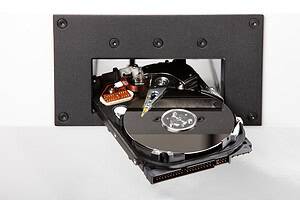
A traditional hard disk drive, often shortened to HDD, stores data magnetically on spinning platters. These platters are read by mechanical heads. If the magnetic patterns on the platters are destroyed or disrupted, the data becomes unreadable.
An SSD does not have spinning platters, magnetic storage surfaces or moving read/write heads. Instead, it stores data electronically in NAND flash memory chips. These chips retain data even when the device is powered off.
This difference affects every part of the destruction decision. With a hard drive, the data-bearing surface is inside the drive on the platters. With an SSD, data may be spread across multiple memory chips on a circuit board. Depending on the design, those chips may be inside a 2.5-inch drive casing, an M.2 module, a PCIe card, a laptop motherboard, a server module or another embedded storage format.
A process that focuses only on destroying a drive casing may not sufficiently destroy the flash memory chips. This is one reason SSD destruction needs careful handling.
Why does degaussing not work on SSDs?
Degaussing works by applying a powerful magnetic field to magnetic storage media. It can be effective for magnetic hard disk drives and some magnetic tapes because those media store data through magnetic patterns.
SSDs do not store data magnetically. They store it electronically in flash memory. Because of that, degaussing is not a suitable SSD destruction method. A degausser may damage some electronic components, but it should not be relied upon to destroy the data held in NAND chips.
This is one of the most common misunderstandings in IT asset disposal. Businesses may have an established process that says all drives should be degaussed before disposal. That may have been appropriate when most business storage was magnetic. It is not enough in a modern environment where laptops, desktops, servers and removable media often use flash-based storage.
The National Cyber Security Centre states that secure sanitisation is about ensuring data held on electronic storage media cannot be read by unauthorised parties once it has left organisational control. Its guidance also highlights the need to understand the storage media before deciding how it should be sanitised or disposed of. (National Cyber Security Centre)
In practical terms, that means identifying whether a device is a magnetic hard drive, SSD, USB drive, memory card or other storage type before deciding what to do with it.
What makes SSD data destruction more complex?
SSD data destruction is more complex because flash storage does not behave like a traditional hard drive. Even when a business tries to erase an SSD, the device may manage data internally in ways that are not obvious to the user.
Wear levelling
SSDs use wear levelling to spread write and erase activity across memory cells. This helps extend the life of the drive, but it also means data may not sit in one predictable location. A file that appears to have been overwritten may still exist in another physical area of the flash memory.
Over-provisioning
Many SSDs include extra storage capacity that is not directly visible to the operating system. This reserved space helps with performance and drive health. However, it can create complications for wiping because not every physical area may be accessible through standard software tools.
Bad blocks and inaccessible memory areas
Flash memory can develop blocks that are no longer used by the drive during normal operation. Data may remain in areas that are no longer easily addressable by normal commands. This does not automatically mean recovery is simple, but it does mean basic deletion or formatting should not be treated as a complete destruction method.
Multiple form factors
SSDs come in several shapes and designs. Some look like traditional laptop hard drives, while others are small circuit boards or embedded chips. A business may not always recognise them as storage media during disposal.
This is particularly risky in mixed IT collections. A box of redundant computers, laptops, servers and external devices may contain both hard drives and SSDs. If everything is treated the same way, some media may not be destroyed correctly.
Why is deleting files from an SSD not enough?
Deleting files from an SSD is not the same as destroying the data. In many systems, deletion removes the file reference and marks the space as available for reuse. It does not necessarily provide immediate, verifiable destruction of all data across every memory cell.
Formatting an SSD can create the same problem. The drive may appear empty, but data may still be present in areas not fully overwritten or sanitised.
For low-risk personal devices, software-based erasure may be considered in certain circumstances when performed correctly. For business disposal, particularly where sensitive or personal data is involved, organisations need a more controlled and auditable process.
The ICO’s disposal and deletion guidance expects organisations to destroy records containing personal information permanently in line with retention schedules and to log management approval before destruction. (ICO) This reinforces the importance of documented processes, not informal deletion.
For organisations with UK GDPR responsibilities, the question is not simply whether a device looks empty. The question is whether the business can show that personal data was protected against unauthorised access during disposal.
What SSD destruction methods are suitable?
The right SSD destruction method depends on whether the device is being reused or permanently disposed of.
If an SSD is being reused within the organisation, secure sanitisation may be appropriate where suitable tools, verification and policies are in place. If the SSD is leaving organisational control or contains highly sensitive data, physical destruction is often the more appropriate option.
SSD crushing
SSD crushing applies force to damage the storage device and its internal components. However, because SSDs store data in memory chips, the process must be suitable for flash media. A general hard drive crusher may not always provide the same level of assurance for SSDs unless it is designed or configured for that purpose.
The goal is not simply to bend the casing. The data-bearing chips must be destroyed sufficiently to prevent recovery.
SSD shredding
SSD shredding breaks the device into small particles. For secure destruction, the particle size and process should be appropriate for the sensitivity of the data and the media type. Shredding is often used where a business wants a permanent, visible and auditable outcome.
This method can be particularly useful for organisations processing multiple SSDs as part of laptop refreshes, server upgrades or IT asset disposal programmes.
Disintegration of flash media
For highly sensitive data, more intensive destruction may be needed to ensure the memory chips are destroyed to a very small particle size. This is more common in high-security environments or where contractual and regulatory obligations require stronger assurance.
Chip-level destruction
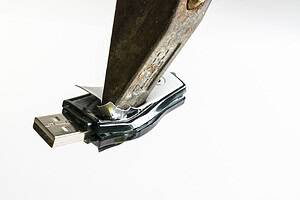
In some cases, the data-bearing NAND chips themselves may need to be targeted. This is especially relevant for small devices such as USB sticks, memory cards, mobile devices, embedded modules and some specialist equipment.
How should businesses handle mixed hard drive and SSD disposal?
The safest approach is to separate storage media by type before destruction. A single collection of redundant IT equipment may include magnetic hard drives, SSDs, USB devices, memory cards and backup media. Each type may need a different process.
A practical handling process should include:
- Identifying all devices that may contain data
- Separating magnetic hard drives from SSDs and flash media
- Recording assets or quantities
- Choosing the correct destruction method for each media type
- Maintaining secure handling and chain of custody
- Obtaining a certificate of data destruction
- Recycling remaining materials responsibly where appropriate
This prevents a common issue: using a familiar hard drive destruction process on newer flash storage.
Real-world scenario: laptop refresh project
A business replaces 150 laptops across several departments. Some older laptops contain magnetic hard drives, while newer models contain SSDs. The IT team removes the drives and places them into one secure container for disposal.
If the disposal process assumes that every device is a magnetic hard drive, SSDs may be treated incorrectly. Degaussing may be used on the whole batch, leaving the flash-based devices insufficiently destroyed.
A better process would involve identifying and separating the media first. Magnetic hard drives could be degaussed or shredded, while SSDs would be crushed, shredded or otherwise physically destroyed using a suitable method. The organisation would then keep a certificate and audit trail showing how each media type was handled.
Real-world scenario: old servers with mixed storage
A data centre retires a group of servers. Some contain traditional hard drives, some contain SSDs used for caching, and some include removable flash modules. If the team only removes the obvious 3.5-inch drives, other data-bearing components may remain inside the equipment.
This is why secure data destruction should be built into the asset retirement process from the start. The business needs to know where data may be stored, not just where it expects data to be stored.
What evidence should organisations keep?
Evidence is essential because secure destruction is not just a technical task. It is also part of information governance, audit readiness and compliance.
Useful records may include:
- Asset registers
- Serial number logs
- Collection notes
- Chain of custody records
- Media type records
- Destruction method details
- Certificate of data destruction
- Recycling or disposal documentation
A certificate should accurately reflect the method used. It should not simply say that data was destroyed without identifying how the media was processed. If SSDs were physically destroyed, the certificate should make that clear.
This matters because a business may need to demonstrate that it followed appropriate steps if questioned by a client, regulator, auditor, insurer or internal compliance team.
How does SSD destruction support GDPR data disposal?
SSD destruction supports GDPR data disposal by reducing the risk of personal data being accessed after equipment is retired, resold, recycled or removed from business control.
UK GDPR requires organisations to use appropriate security measures to protect personal data. Secure destruction is part of that duty when storage media reaches end of life. If an SSD containing personal data is disposed of without proper destruction, the organisation could face breach risk, reputational harm and compliance questions.
The key is appropriateness. A method that is suitable for one type of storage media may not be appropriate for another. For SSDs, that means recognising that degaussing is not enough and that flash storage may need specialist physical destruction when reuse is not required.
What should businesses ask before choosing an SSD destruction method?
Before choosing an SSD destruction method, organisations should ask practical questions about the media, the data and the required evidence.
Important questions include:
- What type of storage media is being destroyed?
- Does the device contain personal or sensitive data?
- Is the SSD being reused or permanently disposed of?
- Will the device leave site before data is destroyed?
- Is the destruction method suitable for flash storage?
- Can the process be documented?
- Will a certificate of data destruction be provided?
- How will remaining materials be recycled?
These questions help businesses avoid relying on assumptions. They also encourage a more consistent approach across departments, locations and asset types.
Frequently Asked Questions
Can SSDs be degaussed?
No. SSDs do not store data magnetically, so degaussing is not a reliable way to destroy SSD data. SSDs require a method suitable for flash memory, such as appropriate physical destruction where the device is not being reused.
Is formatting an SSD enough before disposal?
Formatting an SSD is not usually enough for business disposal, especially where personal or sensitive data is involved. It may make the drive appear empty, but it does not provide the same assurance as a controlled, documented sanitisation or destruction process.
Are SSDs harder to destroy than hard drives?
They can be more complex because data is stored in flash memory chips rather than on magnetic platters. The destruction process must target the data-bearing chips, not just the outer casing.
Can an SSD be reused after secure erasure?
In some cases, yes. If the SSD is staying within a controlled environment and is securely sanitised using an appropriate method, reuse may be possible. If the SSD is leaving organisational control or contains high-risk data, physical destruction may be more appropriate.
Should SSD destruction be certified?
Yes. A certificate of data destruction helps prove that the SSDs were processed using a defined method. This is useful for compliance records, client assurance and internal audits.
Summary
SSDs need a different destruction method from hard drives because they store data differently. Traditional hard drives use magnetic platters, which can be degaussed or physically destroyed. SSDs use flash memory chips, so degaussing is not suitable.
For modern businesses, this difference is more than a technical detail. It affects GDPR data disposal, IT asset retirement, data breach prevention and audit readiness. A business that applies the wrong method may leave sensitive data behind while believing it has been securely destroyed.
The safest approach is to identify the media type, separate SSDs from magnetic drives, choose a destruction method designed for flash storage and keep clear evidence of the process.
Varese Secure Ltd provides secure data destruction, hard drive destruction and compliant disposal services for organisations that need a traceable, security-led approach to end-of-life IT assets.
Contact Varese Secure Ltd
Phone: 01489 854 131
Email: sales@varese-secure.co.uk
Find out more: https://varese-secure.co.uk/
-
How Can Organisations Prove They Followed Secure Destruction Standards?
Organisations can prove they followed secure destruction standards by keeping clear, accurate and traceable evidence of how data-bearing assets were handled, destroyed and disposed of. This evidence should show what was collected, who handled it,…
-
Is Deleting Files Enough Before Disposing of a Computer?
Deleting files before disposing of a computer is not enough for most businesses. When a file is deleted, the computer usually removes the visible reference to that file rather than immediately removing every trace of…
-
What Is the Best Way to Destroy Data on Flash-Based Storage?
Supporting Questions: The best way to destroy data on flash-based storage is to use a destruction method designed for the specific type of device and the level of data risk involved. For end-of-life business assets,…